Zero Data Retention, without the jargon.
Zero Data Retention (ZDR) is a provider-side data control. For eligible API traffic, customer prompts and model outputs are processed to answer the request but are not kept in provider content logs or persistent application state.
What ZDR changes - and what it does not.
Processing still happens
The provider must receive and process the prompt to generate a response. ZDR governs what is retained after that processing.
Stateful features may change
Files, batches, stored conversations, deferred jobs, and hosted media can require persistence, so providers may disable or exclude them.
Your side still matters
ZDR does not erase browser storage, application logs, telemetry, proxies, tools, or third-party services that your own workflow uses.
OpenAI and SpaceXAI
Both providers offer ZDR, but activation scope, verification, and feature tradeoffs differ.
OpenAI API
Eligible customers can configure ZDR at the organization or project level after approval. Customer content is excluded from abuse-monitoring logs.
- Default
- Abuse-monitoring logs may retain customer content for up to 30 days. API data is not used for training unless the customer opts in.
- With ZDR
- Eligible endpoints avoid customer-content retention for abuse monitoring and application state. For Chat Completions and Responses,
storeis treated asfalse. - Watch for
- Endpoint eligibility and documented exceptions. Stateful resources such as conversations, files, vector stores, batches, and some media workflows are not ZDR eligible.
SpaceXAI API
Where available, a team administrator enables ZDR for the whole team. It then applies automatically to every API key associated with that team.
- Default
- Requests and responses are encrypted at rest, kept for 30 days for auditing, and not used for training without explicit permission.
- With ZDR
- Prompt and output content is never persisted to disk. The
x-zero-data-retentionresponse header reports whether ZDR is active. - Watch for
- Stateful Responses, Files, Collections, Batch, deferred completions, and provider-hosted media features are unavailable or restricted.
Verify the whole path, not just the label.
ZDR is one control in a larger data-handling design. Confirm each layer before relying on it for regulated or confidential workloads.
- 1Confirm activationCheck the correct OpenAI project or SpaceXAI team, not only the API key name.
- 2Check eligibilityUse a supported endpoint, model, and capability; avoid features that require provider-side state.
- 3Inspect your applicationReview browser storage, request logging, telemetry, gateways, MCP servers, and other third parties.
- 4Re-verify over timeProvider terms and endpoint behavior evolve. Use current documentation and contractual controls.
Deliver generated media without provider storage.
Deploy a small Azure-hosted handoff service for ZDR-compatible SpaceXAI Imagine Video workflows.
Some ZDR scenarios cannot use provider-hosted output. For example, when a SpaceXAI Imagine
Video model runs with ZDR enabled, the request's output.upload_url must
point to a customer-controlled URL that accepts an HTTP PUT containing
the generated video payload.
This page provides access to an Azure Function App that implements that upload
PUT endpoint and a corresponding GET endpoint. Use the two
endpoints in the SpaceXAI Imagine Video playground to generate with ZDR enabled, keep the
video in storage you control, and let the playground download it automatically when
generation completes.
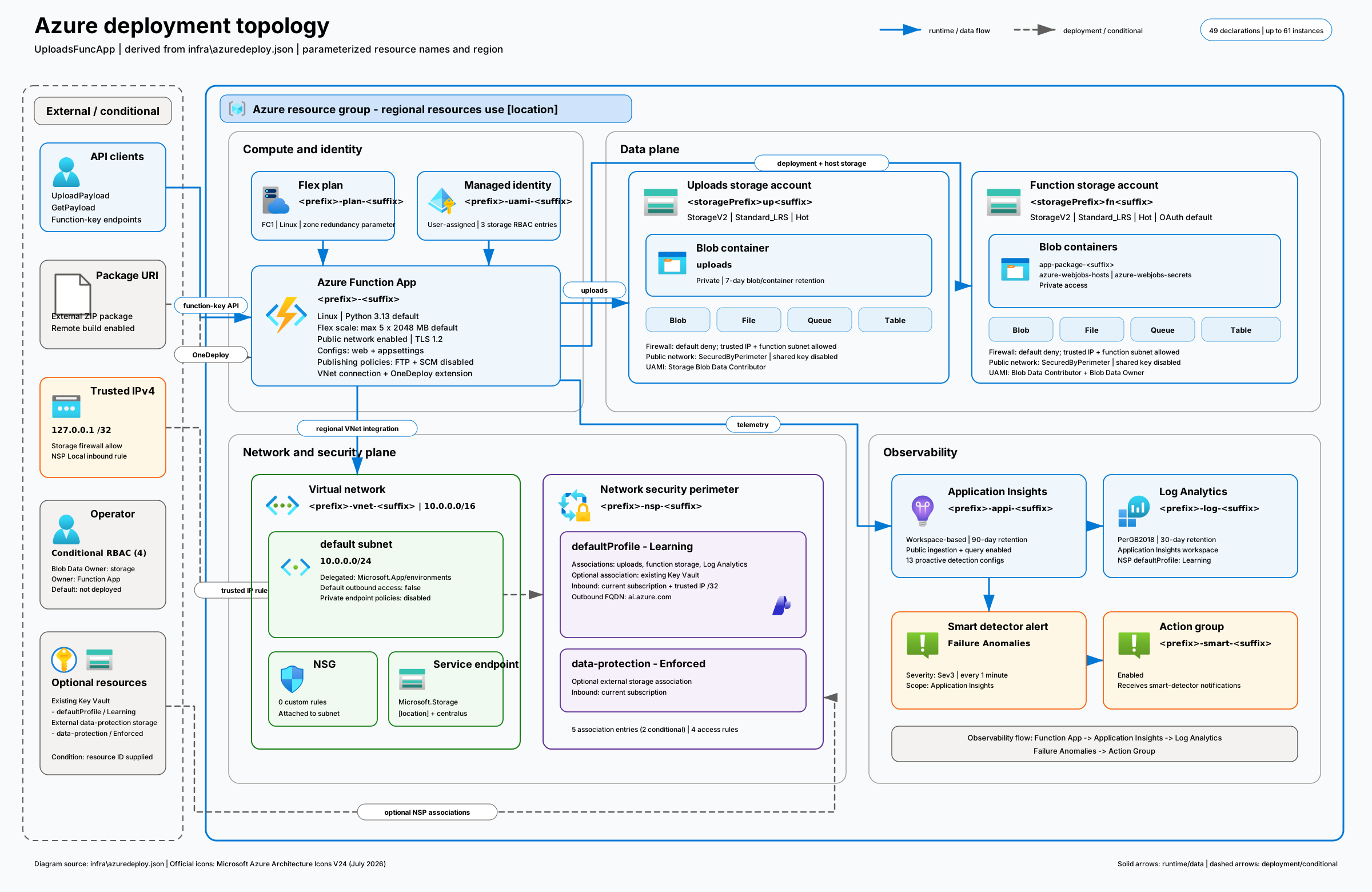
Azure Function App and storage boundary
Inspect the compute, identity, storage, network, security, and observability resources used by the upload service.
import logging
import os
import uuid
from functools import lru_cache
from typing import Optional
from unicodedata import category

import azure.functions as func
from azurefunctions.extensions.http.fastapi import JSONResponse, Request, StreamingResponse


STORAGE_ACCOUNT_ENV = "STORAGE_ACCOUNT_NAME"
STORAGE_CONTAINER_ENV = "STORAGE_CONTAINER_NAME"
MANAGED_IDENTITY_CLIENT_ID_ENV = "AzureWebJobsStorage__clientId"
UPLOAD_ID_QUERY_PARAM = "uploadId"
MAX_BLOB_NAME_LENGTH = 1024
MAX_BLOB_NAME_PATH_SEGMENTS = 254
SENSITIVE_HEADER_NAME_PARTS = (
    "authorization",
    "client-principal",
    "cookie",
    "credential",
    "key",
    "password",
    "secret",
    "signature",
    "token",
)

app = func.FunctionApp(http_auth_level=func.AuthLevel.FUNCTION)


@app.function_name(name="UploadPayload")
@app.route(route="payload", methods=["PUT"], auth_level=func.AuthLevel.FUNCTION)
async def upload_payload(req: Request) -> JSONResponse:
    _log_request_headers(req)

    payload = await req.body()
    if not payload:
        return _json_response({"error": "Request body must not be empty."}, 400)

    try:
        storage_account_name = _required_setting(STORAGE_ACCOUNT_ENV)
        container_name = _required_setting(STORAGE_CONTAINER_ENV)
        managed_identity_client_id = _required_setting(MANAGED_IDENTITY_CLIENT_ID_ENV)
    except RuntimeError as error:
        logging.error(str(error))
        return _json_response({"error": str(error)}, 500)

    blob_name = _blob_name_from_upload_id(req.query_params.get(UPLOAD_ID_QUERY_PARAM))
    content_type = req.headers.get("content-type") or "application/octet-stream"

    try:
        from azure.core.exceptions import HttpResponseError, ResourceExistsError, ResourceNotFoundError
        from azure.storage.blob import ContentSettings

        blob_client = _blob_service_client(
            storage_account_name,
            managed_identity_client_id,
        ).get_blob_client(
            container=container_name,
            blob=blob_name,
        )
        blob_client.upload_blob(
            payload,
            overwrite=False,
            content_settings=ContentSettings(content_type=content_type),
        )
    except ImportError:
        logging.exception("Azure SDK dependencies are not installed.")
        return _json_response({"error": "Azure SDK dependencies are not installed."}, 500)
    except ResourceExistsError:
        logging.exception("Blob name collision for blob name %s.", blob_name)
        return _json_response({"error": "Blob name already exists."}, 409)
    except ResourceNotFoundError:
        logging.exception("Storage container %s was not found.", container_name)
        return _json_response({"error": "Configured storage container was not found."}, 500)
    except HttpResponseError:
        logging.exception("Failed to upload payload to Azure Blob Storage.")
        return _json_response({"error": "Failed to upload payload to Azure Blob Storage."}, 502)

    logging.info("Uploaded payload to container %s as blob %s.", container_name, blob_name)
    return _json_response(
        {
            "storageAccount": storage_account_name,
            "container": container_name,
            "blobName": blob_name,
        },
        201,
    )


@app.function_name(name="GetPayload")
@app.route(route="payload", methods=["GET"], auth_level=func.AuthLevel.FUNCTION)
async def get_payload(req: Request):
    _log_request_headers(req)

    upload_id = req.query_params.get(UPLOAD_ID_QUERY_PARAM)
    if not upload_id:
        return _json_response({"error": "uploadId query string parameter is required."}, 400)
    if not _is_valid_blob_name(upload_id):
        return _json_response({"error": "uploadId must be a valid Azure Blob Storage blob name."}, 400)

    try:
        storage_account_name = _required_setting(STORAGE_ACCOUNT_ENV)
        container_name = _required_setting(STORAGE_CONTAINER_ENV)
        managed_identity_client_id = _required_setting(MANAGED_IDENTITY_CLIENT_ID_ENV)
    except RuntimeError as error:
        logging.error(str(error))
        return _json_response({"error": str(error)}, 500)

    try:
        from azure.core.exceptions import HttpResponseError, ResourceNotFoundError

        blob_client = _blob_service_client(
            storage_account_name,
            managed_identity_client_id,
        ).get_blob_client(
            container=container_name,
            blob=upload_id,
        )
        blob_properties = blob_client.get_blob_properties()
        blob_stream = blob_client.download_blob()
    except ImportError:
        logging.exception("Azure SDK dependencies are not installed.")
        return _json_response({"error": "Azure SDK dependencies are not installed."}, 500)
    except ResourceNotFoundError:
        logging.info("Blob %s was not found in container %s.", upload_id, container_name)
        return _json_response({"error": "Blob was not found."}, 404)
    except HttpResponseError:
        logging.exception("Failed to download payload from Azure Blob Storage.")
        return _json_response({"error": "Failed to download payload from Azure Blob Storage."}, 502)

    content_settings = blob_properties.content_settings
    content_type = content_settings.content_type if content_settings else None

    logging.info("Streaming payload from container %s blob %s.", container_name, upload_id)
    return StreamingResponse(
        blob_stream.chunks(),
        media_type=content_type or "application/octet-stream",
        headers={"Content-Length": str(blob_properties.size)},
    )


def _required_setting(name: str) -> str:
    value = os.environ.get(name)
    if not value:
        raise RuntimeError(f"Missing required application setting: {name}")
    return value


def _blob_name_from_upload_id(upload_id: Optional[str]) -> str:
    if upload_id and _is_valid_blob_name(upload_id):
        return upload_id
    return f"{uuid.uuid4()}.dat"


def _is_valid_blob_name(blob_name: str) -> bool:
    if not 1 <= len(blob_name) <= MAX_BLOB_NAME_LENGTH:
        return False
    if len(blob_name.split("/")) > MAX_BLOB_NAME_PATH_SEGMENTS:
        return False
    if blob_name.endswith((".", "/", "\\")):
        return False
    if "\\" in blob_name:
        return False
    if any(segment.endswith(".") for segment in blob_name.split("/")):
        return False
    return not any(_is_invalid_blob_name_character(character) for character in blob_name)


def _is_invalid_blob_name_character(character: str) -> bool:
    code_point = ord(character)
    return (
        category(character)[0] == "C"
        or 0xFDD0 <= code_point <= 0xFDEF
        or code_point in (0xFFFD,)
        or code_point & 0xFFFE == 0xFFFE
    )


def _log_request_headers(req: Request) -> None:
    for header_name, header_value in req.headers.items():
        logging.info(
            "Request header: %s=%s",
            header_name,
            _header_log_value(header_name, header_value),
        )


def _header_log_value(header_name: str, header_value: str) -> str:
    normalized_header_name = header_name.lower()
    if any(part in normalized_header_name for part in SENSITIVE_HEADER_NAME_PARTS):
        return "[REDACTED]"
    return header_value


@lru_cache(maxsize=16)
def _blob_service_client(storage_account_name: str, managed_identity_client_id: str):
    from azure.storage.blob import BlobServiceClient

    account_url = f"https://{storage_account_name}.blob.core.windows.net"
    return BlobServiceClient(
        account_url=account_url,
        credential=_credential(managed_identity_client_id),
    )


@lru_cache(maxsize=8)
def _credential(managed_identity_client_id: str):
    from azure.identity import DefaultAzureCredential, ManagedIdentityCredential

    if os.getenv("WEBSITE_HOSTNAME"):
        return ManagedIdentityCredential(client_id=managed_identity_client_id)
    return DefaultAzureCredential(managed_identity_client_id=managed_identity_client_id)


def _json_response(body: dict[str, str], status_code: int) -> JSONResponse:
    return JSONResponse(
        content=body,
        status_code=status_code,
    )
# DO NOT include azure-functions-worker in this file.
# The Python worker is managed by the Azure Functions platform.
azure-functions
azurefunctions-extensions-http-fastapi
azure-identity
azure-storage-blob
{
  "version": "2.0",
  "logging": {
    "applicationInsights": {
      "samplingSettings": {
        "isEnabled": true,
        "excludedTypes": "Request"
      }
    }
  },
  "extensionBundle": {
    "id": "Microsoft.Azure.Functions.ExtensionBundle",
    "version": "[4.*, 5.0.0)"
  }
}
The button opens the Azure Portal and starts deployment of the Function App for a
ZDR-enabled SpaceXAI Imagine Video model. After deployment completes, open the deployment
Outputs section and copy putEndpointUrl and
getEndpointUrl. In the Imagine Video playground's
Output delivery and storage section, use putEndpointUrl
for Output PUT Upload URL and getEndpointUrl for
Output GET Download URL.
This page is an implementation guide, not a contractual guarantee or legal advice. The provider's current documentation and your agreement govern.